
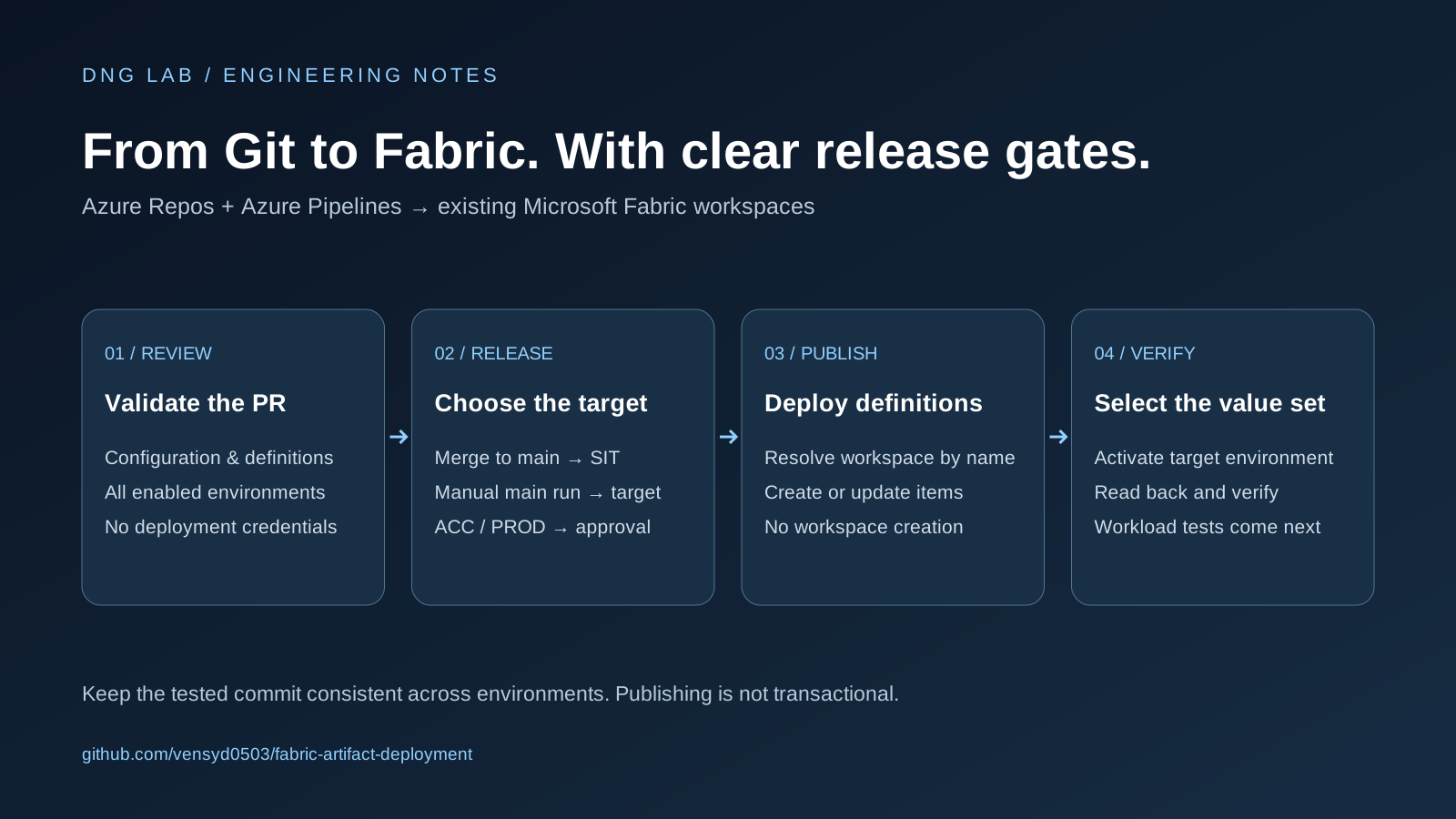
Moving a notebook or pipeline between environments is only one part of a Fabric release. The harder questions are operational: which workspace is the target, which connections should it use, who can approve production, and what does a successful deployment actually prove?
My Fabric artifact deployment project makes those decisions explicit. It is a reusable community template for publishing Microsoft Fabric definitions into existing workspaces, using Azure Repos and Azure Pipelines. GitHub hosts the template; GitHub Actions is not the execution workflow documented by this project.
Start with a precise deployment boundary
The template separates three responsibilities. Step A prepares the deployment identity: an Entra application or service principal, a federated credential, and an authorised Azure DevOps service connection. Step B prepares the workspace, including capacity, runtime settings, permissions, connections, and data access. This repository implements Step C: artifact deployment.
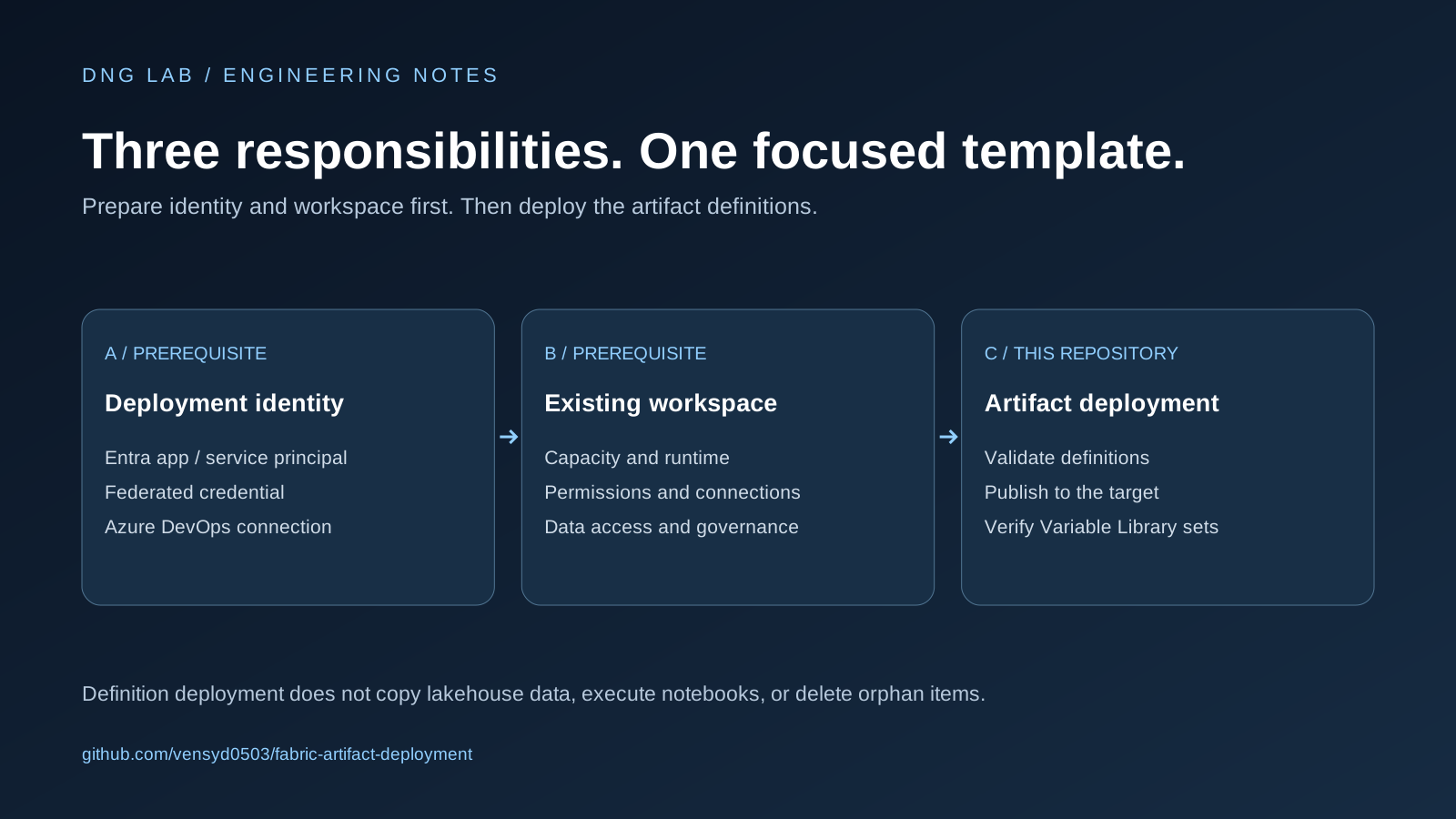
That boundary matters. The script can create missing items and update matching items, but it does not provision a workspace or grant access. It also does not copy lakehouse data, execute notebooks, or delete orphan items. A successful run means the definitions were deployed and the Variable Library checks passed—not that every business workload has been tested.
Validate a pull request without deployment credentials
The repository includes a separate PR validation pipeline. It installs the pinned dependencies using Python 3.12 and runs:
python deployment/artifacts.py validate --allThis checks all enabled environments. The validation code looks for Fabric .platform definitions, supported item types, valid logical IDs, duplicate identities, the required environment names in Variable Library settings, and scoped parameter replacements. The pinned fabric-cicd parameter validator also checks the parameter file.
The PR pipeline has no Fabric service connection and receives no deployment token. In Azure Repos, it must be attached to main as an automatic, required build-validation policy. The YAML explicitly uses pr: none; the branch policy is what triggers the PR check. Without that policy, simply adding the YAML file does not create a protected review process.
Make promotion an explicit decision
Updates to main automatically target SIT. A manual run on main can select DEV, SIT, ACC, or PROD, provided the environment has been enabled and configured. The deployment stage rejects PR runs and requires the main branch; the Python entry point repeats that check before making Fabric mutations.
ACC and PROD add a manual validation job. The YAML disables approval of a requester's own run and rejects the approval on timeout. The adoption guide also calls for production service-connection permissions and checks outside editable YAML. Those controls matter because a pipeline file alone should not be the entire production security boundary.
Promotion should use the same tested commit. Running separate releases against the latest main can deploy different versions if another change lands between runs. Record the tested commit and review that version when approving the next environment.
Resolve the workspace instead of hard-coding its ID
Environment configuration stores an exact workspace name, a workspace prefix, and the nonsecret identity and service-connection IDs. The script resolves the workspace ID at runtime through the Fabric API.
An override must follow <prefix>-<environment>[-suffix]. Resolution fails if the workspace is missing, inaccessible, ambiguous, or has different casing. The script also checks that capacity is assigned and that its assignment is complete. It does not resume a paused capacity or verify every workspace prerequisite.
This approach makes the target readable in the release request while avoiding a hard-coded destination workspace ID. It still depends on careful workspace naming and correctly prepared permissions.
Treat environment values as part of the release
Variable Libraries need actual named value sets for each enabled environment, using the exact uppercase names DEV, SIT, ACC, and PROD. Commit the complete library definition: adding a name to valueSetsOrder alone does not create the value set.
After publish_all_items completes, the script resolves each deployed Variable Library. If its active value set does not match the target environment, it updates it and reads the library back. A remaining mismatch fails the run. This verification also runs when an unchanged library was skipped during publication.
The project keeps connection values in Variable Library value sets. Its parameter.yml supports scoped source-reference replacements where needed; it rejects replacement entries without an item or file scope. Blanket GUID replacement would obscure the meaning of a change and is not the intended approach.
Understand what the template supports today
The reviewed implementation scopes publication to VariableLibrary, Lakehouse, Notebook, DataPipeline, and Map items. Adding another item type requires a review of both the code and current service-principal/API support. The requirement to include a Variable Library whenever Data Pipelines are present is a rule of this template, not a universal Fabric requirement.
Authentication uses AzurePipelinesCredential, the existing federated service connection, and the pipeline's System.AccessToken. Preserve the skipped AzureCLI endpoint declaration and the token environment mapping when adapting the YAML. Tokens and credentials do not belong in the repository.
Publication is not transactional. If a later item fails, earlier items may already have changed. Serialize releases to each workspace, inspect partial failures, and run separate workload checks before treating the release as operationally complete. Local validation cannot prove credentials, connection access, or successful execution of your business logic.
Adopt it in your own project
- Import the template into Azure Repos and connect Fabric Git to
fabric_components. - Prepare the deployment identity and workspace for every intended target.
- Replace the environment placeholders and set the service-connection prefix to match your existing connections.
- Add complete Fabric-exported item folders, including their
.platformfiles, definitions, and environment value sets. - Configure required PR build validation, validate the change, and merge to deploy to SIT.
- Test the workload, then promote the tested commit through the appropriate approval gates.
The public template deliberately contains no business artifacts or real environment IDs. Validation is expected to fail until those placeholders are replaced and definitions are supplied. It is a starting point to adapt, not a ready-to-run deployment of a sample business solution.
Read the step-by-step adoption guide for setup details. The project is MIT-licensed and is a community template, not an official Microsoft product.
Source note: This walkthrough is based on repository commit de3744009f81, reviewed on 21 September 2026. It is a code walkthrough, not a report of a deployment test against a live Fabric tenant.